
How to give different people different access
On Loisium, open People and access and put each person on the list that fits: using your software, looking after its data, or working on its code. It's all done by email address, and your code stays as it is.
Who goes where
Say you run a hiring tool called HireTrack, with four people around it. Call them User 1 to User 4.
- User 1 only needs to use it
- Add User 1 under Who can use HireTrack. User 1 opens HireTrack at its address and can use all of it, and sees nothing inside Loisium.
- User 2 fixes wrong entries
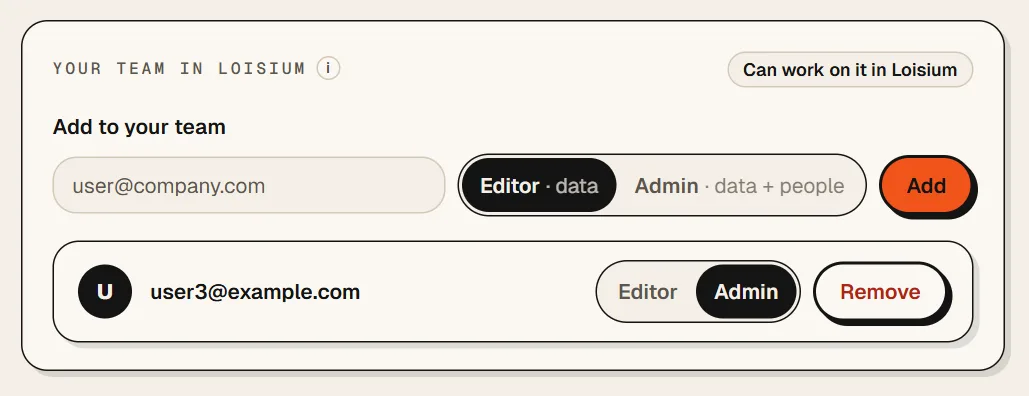
- Add User 2 under Your team in Loisium as an Editor. User 2 opens the data in Loisium and changes rows there.
- User 3 looks after the people
- Add User 3 to the same list as an Admin. An Admin can do what an Editor can, and also adds and removes people on both lists.
- User 4 is your developer
- Add User 4 under Who can work on the code. User 4 sends drafts, Lois checks each one, and you decide. If you're happy for User 4 to put them live too, press Give "can go live".
- You
- You're the owner. Settings, the code and deleting the software stay with you.
The bit that surprises people
The lists don't overlap. Being an Editor doesn't let User 2 open HireTrack itself. Being on the first list doesn't let User 1 into Loisium. If User 2 needs both, add User 2 to both.
To add someone
- Open your software in Loisium and press People and access.
- Find the right list and type their email address.
- On Your team in Loisium, pick Editor or Admin.
- Press Add. Someone new gets a mail with an invite.
You can change an Editor to an Admin later, or press Remove. Who did what keeps a record of who changed what.
What this can't do
And if your software should show User 1 one page and User 2 another, that's decided inside your software, in its own code. Loisium decides who gets through the door.
If your software is open to everyone, there's no first list at all. Your team list still works the same.

Next
Checked against Loisium on 4 November 2026.