
How to make your website private
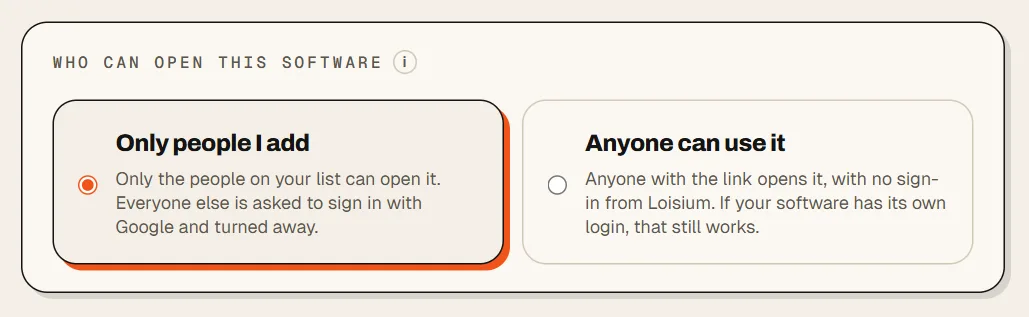
In Loisium, open People and access and choose Only people I add. From then on, only the email addresses on your list can open your website.
Say HireTrack is your hiring tool, and you want two people in it and nobody else. Call them User 1 and User 2.
There's no shared password to hand around. Each person signs in as themselves. When User 1 leaves, you take User 1 off the list and User 2 doesn't notice a thing.
If it's already online
- Open your software in Loisium. In the menu on the left, press People and access.
- Under Who can open this software, press Only people I add. It works straight away, even for someone who has the page open right now.
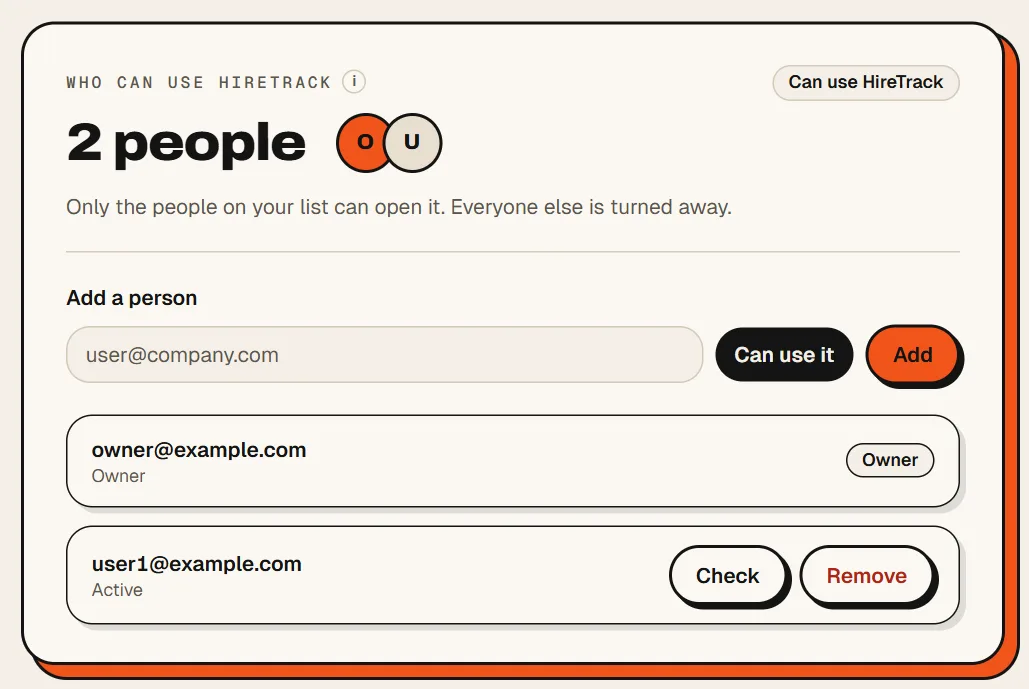
- Under Add a person, type the email address User 1 uses and press Add. User 1 gets a mail with an invite.
- Send User 1 the address. User 1 presses Sign in with Google, and HireTrack opens. That's the only way to sign in today, so the address on your list has to be one User 1 can use for it.
Not online yet? Then there's nothing to switch. Only people I add is already picked on the form when you make it.
What a stranger sees
A sign-in page, and then a refusal. They never reach your website. Loisium stands in front of it and does the checking, so you add nothing to your code, and your website doesn't need a login of its own.
When someone should stop getting in
Press Remove beside their name. They're refused from their very next click.
Not sure whether somebody can get in? Press Check beside their name. It tells you what that person can do, and if they can't, why not.
Want to open it to everyone again later? Same place, press Anyone can use it.

Next
Checked against Loisium on 4 November 2026.