
How to know if something is wrong with your software
You usually don't have to go looking. On Loisium, Lois is watching your software day and night, and it tells you what it found and what it did about it.
What Lois is already doing
- Every minute: is it still running? If it stopped, Lois looks for the reason. If it ran out of memory, Lois gives it more, up to 2 GB, and starts it again. If the machine restarted, Lois brings it back.
- When a part is missing: if your software crashes because of a package Lois can name for certain, Lois adds it and starts it again.
- Before a new version goes live: Lois opens its pages and fills in its forms on a copy of your real data, and shows you what changed in Preview.
- For five minutes after Go live: Lois keeps opening those pages. If the home page or half the pages fail, the last good version goes back. If one page broke and it worked before, only what broke it is put back.
- Every day: the packages your software is built from are checked against lists of known holes and known malware. Where there's a fix Lois can prove on a copy, Lois puts it live and mails you what changed, with a way to take it back.
- Once an hour: Lois looks at what's filling up: your database, your files, memory, the processor, and pages getting slower. It warns you before you hit the limit, under What Lois sees coming.
- Once a week: Lois runs the whole Scan by itself.
Where it tells you
Overview gives you one word at the top: Working or Needs you.
The chat beside it tells you what happened since you last looked, in a few lines. What Lois did keeps the full list.
You get a mail when something can't wait: your software has stayed down for half an hour after three tries and people use it, something is about to fill up, Lois changed a package, or the weekly Scan found something that needs you.
What Lois can't sort out alone
If your software needs a setting only you have, like a key from a payment company, Lois tells you which one. If it dies the moment it starts and no new version is to blame, it says Needs you. If the mistake is in the code, the fix has to come from whoever wrote it.
If you'd like to look for yourself
- Open your software in Loisium. Overview is first.
- Press Visitors. Look for May not be working, which lists pages that may be broken, and Went wrong in people's browsers.
- Press Logs. It's what your software wrote, with what went wrong first, and it's kept for 7 days.
- Want everything looked at now? Press Scan in the menu, then the Scan button. You can leave the page. Lois keeps going.
What Scan looks at
Lois checks 8 things: It's up and working, The parts it's built from, Keys and passwords, Who can get in, Your data is kept, Room to grow, Password storage and Personal data in logs. Pressing it changes nothing in your software. The last two only run when you, the owner, press it, and Lois only counts: no person sees them, and no AI.
Fine means the check found nothing. Lois is on it means you can leave it. Needs you means you can't. Couldn't check doesn't count as fine. Open What Lois found and checked under a row to see more. You can press Scan again after a couple of minutes.
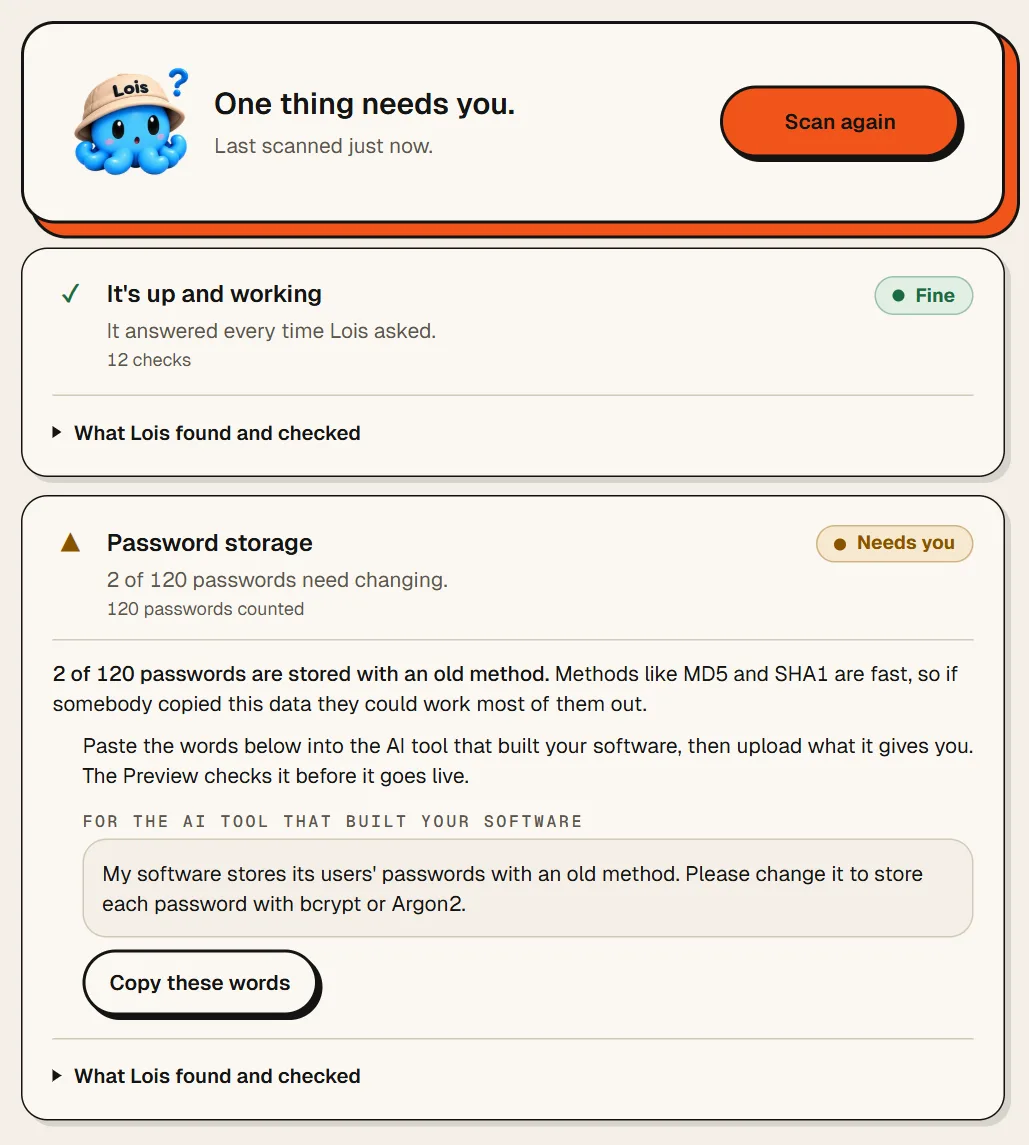
In the picture, 2 of 120 passwords are stored the old way. Lois can't change that in your code, so it gives you the words for the AI tool that built your software. Press Copy these words, paste them in, and upload what it gives you. We're building the way for Lois to make a change like this one itself, so you won't have to carry words from one tool to the other.
What none of this means
A clean result means these checks found nothing. It doesn't mean nothing is wrong. Anything outside them won't show up. And they aren't a person testing your software by trying to break in.

Next
- What to do when your website stops working
- How to give different people different access
- How to get your data back if something goes wrong
Checked against Loisium on 4 November 2026.