
What to do when your website stops working
On Loisium, Lois notices within a minute and tries to start it again, so it may already be back. Open Overview to see what happened, and if it's still down, press Start it again.
What Lois has probably done already
Lois checks every minute, day and night. When your website stops, Lois looks for the reason first, and what it does depends on that.
- It ran out of memory. Lois gives it more, up to 2 GB, and starts it again.
- The machine restarted, or it fell over for no clear reason. Lois starts it again.
- A package is missing and Lois can name it for certain. Lois adds it and starts it again.
- It broke right after a new version. Lois puts back the version before, and checks it on a copy with today's data before it goes live.
If it keeps falling over, Lois keeps trying, with longer waits in between: twice in a row, then after 10 minutes, half an hour, an hour, and every 3 hours after that. If it's still down after half an hour and three tries, and people have been using it this week, you get a mail.
What Lois did lists all of it. And the next time you open Loisium, Lois tells you what happened in a few lines in the chat.
What are people seeing?
- A page with a bar and steps, ending in the website. It was asleep. It takes about 20 seconds, and nothing's wrong.
- A page saying it's resting until a date. The free hours for this month are used up. They come back on the 1st.
- A page saying it isn't answering right now. It has stopped. Carry on below.
If it's still down
- Sign in to Loisium and open your software. Overview comes first. If it's stopped, it says Needs you, and gives the reason in a line, like It ran out of memory and was stopped.
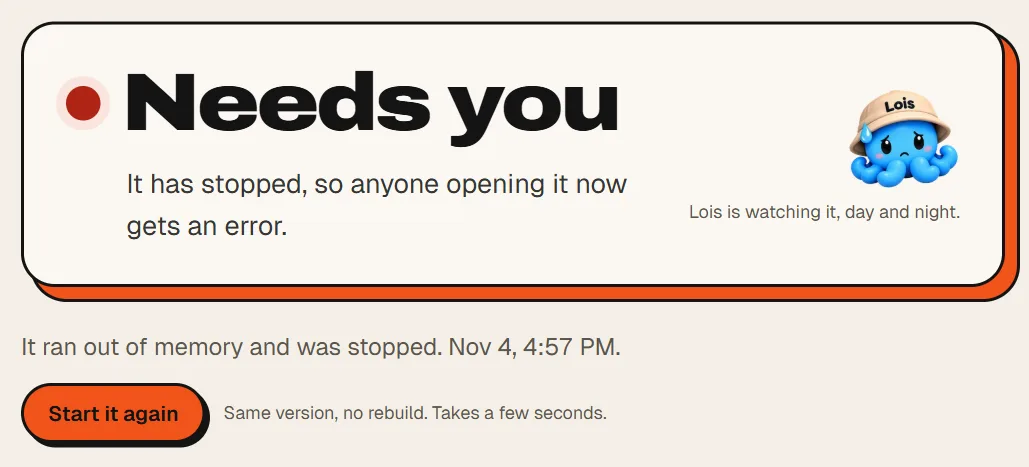
- Press Start it again. It's the same version, nothing is rebuilt, and it takes a few seconds.
- Stopped again? Press Logs in the menu. What went wrong comes first. Copy the red line and give it to whoever built your website, or paste it into the AI tool that did. Soon Lois will do this part for you. We are building that now.
- Did it break right after a new version went live? Then read the guide on going back.
Where this stops helping
If there's a mistake in the code itself, a restart won't cure it. It'll come back every time. The logs tell you where to look, but somebody has to change the code, and that's you, or your developer, or your AI tool. We're teaching Lois to take this on too: find the mistake, fix it on a copy, and show you the result.
The beta also runs on one server. If that server has trouble, everything on it has trouble, and we can't promise it never stops. If your website is down and Loisium won't open either, write to founders@loisium.dev.

Next
- How to go back when a new version breaks things
- How to know if something is wrong with your software
- How to get your data back if something goes wrong
Checked against Loisium on 4 November 2026.