
How to go back when a new version breaks things
Open Deploys and versions in Loisium, find the last version that worked, and press Put this back. Lois builds it again and tries it on a copy of your data before it goes live.
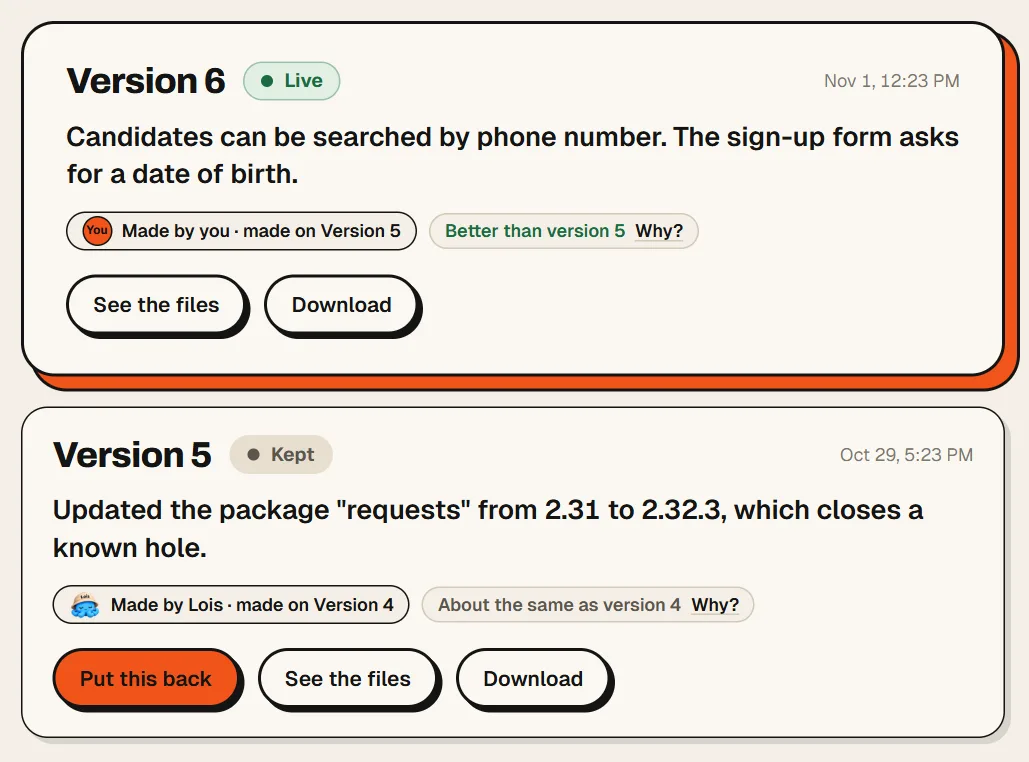
You can do this because nothing was thrown away. Every time you upload your code, Loisium keeps it as a numbered version. Version 5 is still there after version 6 goes wrong.
Lois may get there first
For five minutes after Go live, Lois keeps opening the pages that worked in the preview, now on the live website. If the home page or half the pages fail, the last good version goes back at once. If one page broke and the rest is fine, only what broke that page is put back, and your new version stays. What Lois did tells you it happened.
After that, Lois compares each version with the one before and says when it looks worse. You decide what to do about that.
How to do it
- Open your software in Loisium and press Deploys and versions in the menu.
- Scroll down to Versions. The one in use says Live. Each one has a date and a line saying what changed.
- On the last one that worked, press Put this back.
- Loisium takes you to Preview while Lois builds it and tries it. It either goes live by itself, or stops and asks you first.
Choosing the version is a job Lois is taking over as well, and we're working on it. Until then, when Lois hasn't stepped in, the choice is yours.
If you've only just pressed Go live, you may not need any of that. Overview can offer one button, Put that change back. Everyone goes back to the version from before, and your data doesn't change.
Will I lose what people saved?
Going back is about code. Your data stays where it is, with one exception.
Sometimes a new version changes how the data is stored, and an older version doesn't fit it. Before going live, Loisium names exactly what would be lost, and you get two buttons: Go live and lose this data, or Keep the version that is live. You have to tick a box to pick the first one.
Next time
A new upload goes to Preview first, on a copy of your real data, and nothing changes for anyone until you press Go live. So look at it there and try the thing you changed.
You can also press Download on any version and keep the code on your own computer.

Next
Checked against Loisium on 4 November 2026.